
Regardless of their size, organizations must have secure and reliable communication in today’s fast-paced business environment. In spite of the growth of digital communication methods, faxing is still an essential tool for sending private papers, particularly in industries such as finance, healthcare, and legal services. ITSP Fax Software eliminates the need for conventional fax machines by offering a contemporary, effective, and safe way to send and receive faxes over the internet. It ensures seamless document delivery and management by combining the dependability of conventional faxing with the ease of cloud-based systems. Companies may optimize procedures, cut operating expenses, and increase adherence to industry standards. ITSF Fax Software allows businesses to maintain professional communication at scale with features like email-to-fax, multi-tenant support, encryption, and comprehensive reporting. It is a popular choice for businesses looking for both efficiency and security because its flexibility facilitates seamless integration with current IT infrastructure.
What is ITSP Fax Software?
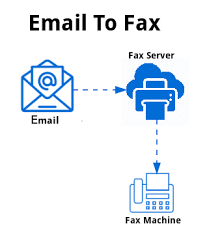
The software is a cloud-based or on-premise solution that allows you to easily send, receive, and manage faxes over the internet using the infrastructure of the ITSP (Internet Telephony Service Provider). It gives organizations a better, more adaptable, and less expensive way to send documents by replacing conventional fax machines and specialized phone lines. With the software’s flawless integration with email systems, users may send faxes from their inbox without needing to print or scan.
ITSP Fax Software guarantees the secure transmission and accurate tracking of sensitive documents thanks to its integrated features, such as audit trails, secure encryption, and support for multi-tenancy. It can be implemented for specific departments, entire businesses, or fax-as-a-service providers. The system improves speed, dependability, and accessibility while lowering running expenses by utilizing internet protocols. In conclusion, ITSP Fax Software offers a contemporary, automated, and professional method of faxing, making it a necessary tool for companies that need secure and compliant document communication.
How It Works
Fax from IT Service Provider. The software transmits and receives faxes digitally using Internet protocols, removing the requirement for actual fax machines and specialized telephone lines. The program converts the document into a digital format, usually PDF or TIFF, and sends it securely over the ITSP network when a user sends a fax. If the recipient uses a fax machine, they will get the fax as a typical fax, or they will get it right into their email inbox as a digital file.
Users may send faxes straight from their current workflows because the system interfaces with email clients, web portals, and occasionally enterprise applications. A multi-tenant architecture allows service providers to manage many clients on a single platform, each with its own accounts, rights, and reporting. Users can be sure of the success or failure of their transmitted faxes because of real-time delivery status, confirmation receipts, and error alerts. High-end features like queue management, retries for unsuccessful broadcasts, and strong encryption ensure reliability and adherence to regulations. In general, ITSP Fax Software makes document communication simpler, automates repetitive operations, and guarantees quick, secure, and traceable fax transmissions.
Key Features of ITSP Fax Software
Email-to-Fax Integration
Users can send faxes directly from their email accounts without printing, scanning, or utilizing conventional fax machines thanks to the ITSP Fax Software. The system handles the transmission automatically; users just need to enter the recipient’s fax number and attach the document. This function makes it easier to manage large amounts of faxes quickly and effectively, simplifies everyday operations, and minimizes human labor. Employees may concentrate more on their core responsibilities since document transmission management is no longer a manual process due to its smooth integration with email.
Safe Encryption
All faxes transmitted through ITSP use sophisticated encryption techniques to protect software in order to guarantee data confidentiality and adherence to laws like HIPAA, GDPR, and other industry standards. The transmission process maintains the security of sensitive information, protecting companies against data breaches and unauthorized access. Encryption not only protects documents but also fosters trust with customers and stakeholders, assuring businesses that they can exchange confidential files safely over the internet.
Multi-Tenant Assistance
Service providers or big companies may manage many firms or divisions independently using the program, which accommodates several tenants on a single platform. Every renter has their own account, rights, and reporting dashboard, which guarantees privacy and a distinct separation of data. The capacity to support multiple tenants simplifies the process of growing operations, integrating new customers, or managing separate divisions without adding new infrastructure. This function is especially beneficial for companies offering B2B services or organizations with complicated organizational setups.
Reports on Real-Time Delivery
Fax from ITSP: Real-time, comprehensive delivery reports are provided by the program, telling users whether a fax was delivered successfully or not. The logs contain crucial data like the time of transmission, the status of the transmission, and the sender and receiver information. This functionality improves accountability, simplifies tracking, and enables companies to react right away when a fax fails. Additionally, managers and administrators may use these reports to track overall performance and improve fax procedures.
Queue and Retry Management
Without the need for human interaction, the program automatically handles fax queues and retries any failed transmissions. The system will try to redeliver at predetermined intervals if a recipient’s fax line is busy or temporarily unavailable. This ensures reliability, minimizes mistakes, and makes sure that every document reaches its intended recipient. Particularly helpful for businesses that process a lot of faxes or work in competitive markets is queue and retry management.
API Integration
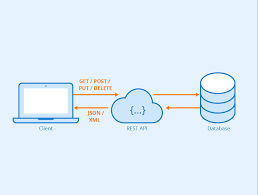
ITSP Fax Software may connect via APIs to current business applications, CRMs, ERP systems, or other enterprise technologies. This lowers human labor and increases operational efficiency by enabling automated fax transmission straight from internal processes. By facilitating a smooth data exchange between the fax system and other business software, API integration ensures more efficient record-keeping, quicker document processing, and seamless communication without interfering with current procedures.
Data Backup and Retrieval
Every fax is kept in a secure archive for compliance, record-keeping, and simple access at any time. Users may easily find papers by sender, recipient, date, or keywords thanks to sophisticated search functions. This enhances document management, aids audits, and makes certain that critical communications are never misplaced. Businesses can also benefit from organized archives by being able to maintain regulatory compliance and gain prompt access to historical fax information for reporting or verification needs.
Customizable Templates and Branding
Users can create personalized fax templates to ensure consistent branding and professional communication. Templates reduce repetitive tasks, promote consistency, and allow fax recipients to easily identify outgoing faxes. This feature is especially helpful for departments that frequently send papers, such as marketing, legal, or formal correspondence, because it saves time and strengthens the company’s brand identity in every faxed communication.
Performance and Scalability
Fax from ITSP. The program is intended to expand in tandem with the business, supporting increases in users, renters, and fax volumes without necessitating significant infrastructure adjustments. The system ensures reliable and rapid document transmission while maintaining high performance even during peak usage. Its flexible architecture enables businesses, regardless of size, to easily grow their operations, offering a future-proof approach to fax management and communication efficiency over the long term.
Challenges of ITSP Fax Software
Complicated Configuration and Installation: Installing ITSP Fax Software can be technically challenging, especially for companies that don’t have specialized IT personnel. Server configuration, email integration, SIP trunks, and network routing all need expert knowledge to ensure fax delivery is reliable. Performance may be impacted by an incorrect configuration, and business procedures might be interrupted by missed transmissions.
Threats to Security and Maintenance: Maintaining the system’s security and functionality requires ongoing maintenance, updates, and security management. Misconfigured parameters or obsolete software may jeopardize regulatory compliance, such as HIPAA or GDPR, and expose private papers to unauthorized access. Data integrity can only be protected by routine monitoring, encryption, and patching.
Integration with Current Systems: Integrating ITSP Fax Software with CRMs, ERP systems, or other commercial applications might be difficult. Custom development or third-party connectors may be necessary to address API intricacies and compatibility problems. The system’s total worth may be diminished if workflow automation and efficiency gains are constrained by poor integration.
Reliance on the Network’s Stability: Because the program depends on an internet connection, fax delivery can be affected by network outages or slow bandwidth. Stable, high-speed connections are necessary in high-volume environments to avoid disruptions or failures. To guarantee continuous and uninterrupted fax transmission, businesses must invest in dependable infrastructure.
Educating and Onboarding Users: To make full use of all features, including sending, receiving, queue management, and report access, workers need adequate training. The system may be underutilized or delayed, or mistakes may occur due to a lack of understanding. Clear documentation and thorough training are necessary for getting the most out of the system and maximizing productivity.
Overcoming the Challenges of ITSP Fax Software
Expert Help for a Streamlined Installation: Companies may use managed hosting options or expert ITSP service providers to handle complicated configuration challenges. The network configuration, email integration, and server setup are handled well by experts. Moreover, deployment is made easier, and the likelihood of mistakes is decreased by the use of preconfigured distributions or GUI-based management tools.
Consistent Security Procedures and Maintenance: Continuous system monitoring, planned updates, and security patches are critical for preserving performance and compliance. To safeguard private information, organizations should put in place access controls, secure authentication, and encryption. Managed services or vendor support can help keep the program secure, reliable, and working at its best.
Using APIs for a streamlined integration: The use of standardized APIs or middleware to interface ITSP Fax Software with current CRMs, ERP systems, or business applications can help overcome integration issues. Automated workflows are made possible, and compatibility concerns are lessened by pre-built connectors or developer assistance, which facilitates seamless communication between all platforms.
Dependable Network Infrastructure: Downtime and transmission failures are reduced by guaranteeing reliable, fast internet connections and appropriate network setups. To ensure consistent fax performance, organizations can use network monitoring, bandwidth optimization, and redundancy. Dependable infrastructure facilitates high-volume faxing and continuous communication.
Training for All Users: Employees may learn how to use the program effectively with the aid of thorough training courses, user guides, and help materials. Instruction includes using sophisticated functions, managing queues, sending and receiving faxes, and creating reports. The advantages of ITSP Fax Software are maximized by effective implementation, which increases productivity and lowers mistakes.
The Advantages and Disadvantages of ITSP Fax Software
Advantages:
Cost-Effective communication: Fax IT By eliminating the need for conventional fax machines, phone lines, and paper-based procedures, software lowers operational expenses. Scalable options are available through cloud-based or on-premises solutions, allowing the company to expand without making significant infrastructure investments.
Improved Compliance and Security: The application provides safe document transmission with encryption, access restrictions, and audit records. Because it adheres to norms like HIPAA, GDPR, and other industry standards, it’s ideal for highly regulated industries like finance, healthcare, and the law.
Increased output and efficiency: Email-to-fax, automated queues, retry management, real-time reporting, and other features improve fax operations. Organizations may efficiently handle enormous amounts of faxes while maintaining correctness since workers spend less time on manual activities.
Adaptability and scalability: Fax from ITSS. Without significant infrastructure modifications, software can handle an increasing number of users, renters, and fax traffic. It can accommodate a variety of deployment configurations, such as hybrid, on-premises, and cloud environments, and it is flexible enough to meet changing business demands.
Reporting and Centralized Management: The application offers a single dashboard for managing users, monitoring fax activity, tracking delivery status, and producing reports. Centralized control makes administration easier, guarantees accountability, and facilitates data-driven decision-making for process enhancements.
Disadvantages:
Technological Sophistication: For businesses without IT knowledge, the initial setup and deployment might be difficult. Getting expert help could be necessary for configuring servers, integrations, and secure connections.
Recurring Maintenance Needs: To maintain the system functioning properly, frequent updates, monitoring, and security management are essential. Failure to maintain equipment can result in errors, downtime, or security flaws.
Reliance on Network Stability: Because ITSP Fax Software depends on internet access, the quality and speed of delivery might be affected by slow bandwidth or unreliable networks. For high-volume faxing, a dependable infrastructure is necessary.
Integration issues: Integration with current business systems might necessitate specific development or API expertise. Automation, workflow optimization, and integration can be restricted without the right integration.
Training requirements for users: All features must be used effectively by trained employees. Errors, delays, or underuse of the software’s sophisticated features might occur due to insufficient training.
FAQs about ITSP Fax Software
What does ITSP Fax Software do?
Fax ITSP With its digital fax capabilities, the Software allows companies to send and receive faxes online. It provides safe, dependable, and efficient document communication by replacing conventional fax machines and phone lines.
What industries may gain from it?
Healthcare, finance, legal, and major corporations, among other sectors, are examples of companies that deal with sensitive information and may gain from this. It is ideal for any company that needs fax transmission that is quick, reliable, and trackable.
Why should a business select ITSP Fax Software?
It increases scalability, lowers costs, improves security, and streamlines workflows. Faxes can be managed effectively by businesses, which can also ensure compliance and integrate smoothly with current applications.
What is the mechanism behind the ITSP Fax program?
The program converts documents into digital formats and transmits them over the ITSP network. Recipients may get faxes via traditional devices or digitally, along with delivery confirmations and live status updates.
When is the ideal time to implement this program?
When companies need to minimize manual faxing, improve security, manage massive amounts of paper, or guarantee regulatory compliance, it’s perfect. The organizations that gain the most are those that prioritize reliability and efficiency.