
Fax broadcasting is sending one document to a long list of numbers in a single run. ICTFax does it from your own server, with DNC screening before anything dials, retry logic that treats different failures differently, and a report at the end telling you exactly which numbers got it. It’s part of the Service Provider Edition, a one off licence at $1,600.
Who still does this, and why
Fax broadcasting sounds like a relic until you look at who’s paying for it. Pharmacy networks pushing formulary updates. Insurance brokers sending rate changes. Freight and logistics firms confirming schedules across hundreds of depots. Healthcare, where a signed fax is still the document of record and email is not.
The common thread is that the recipient isn’t choosing to receive it by fax because it’s modern. They’re on fax because their process, or their regulator, still runs that way. That makes it a channel that actually gets read.
What a run looks like
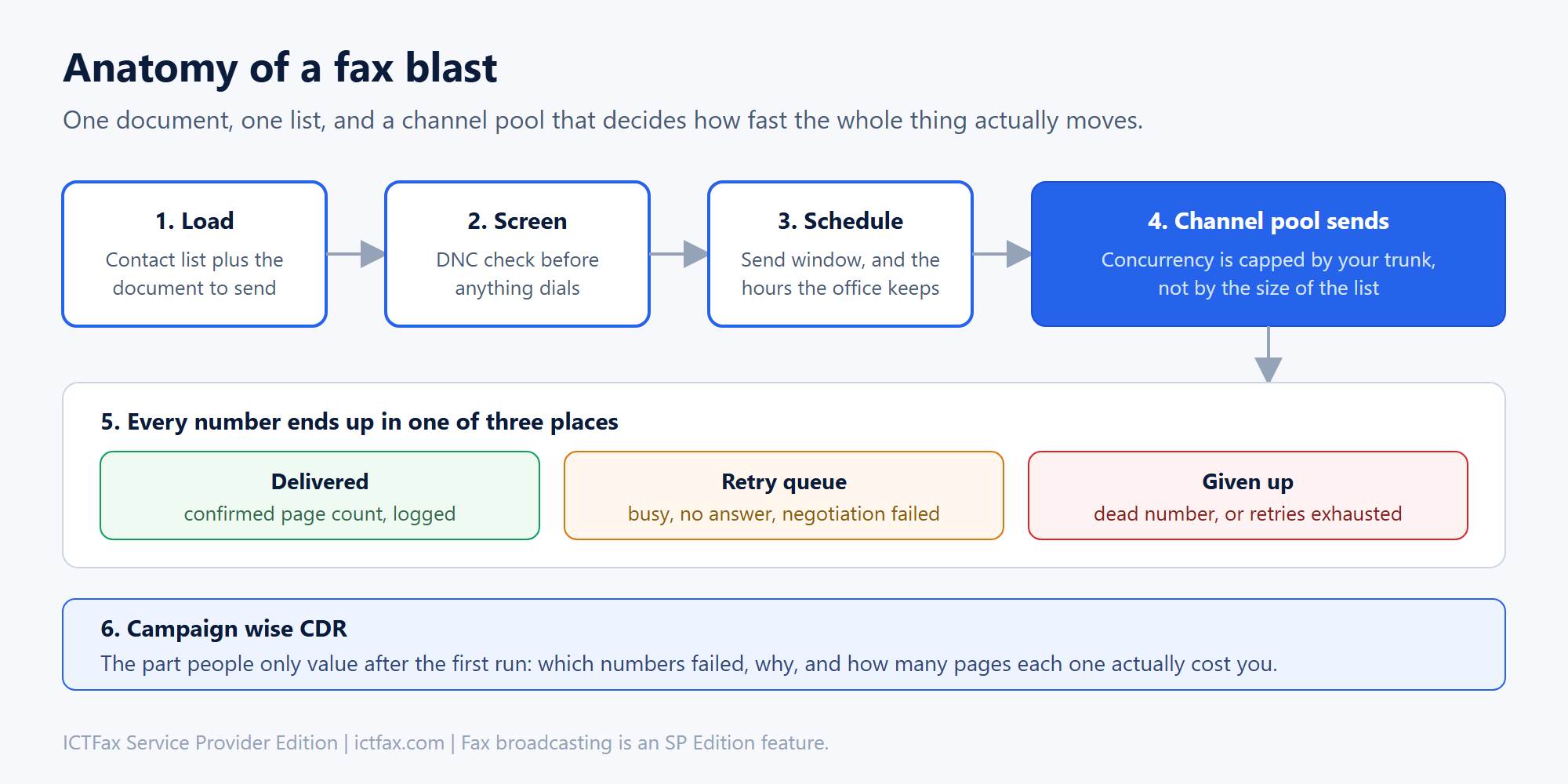
You upload the contact list and the document, the DNC list is applied before a single number is dialled, and you set the window. Then the channel pool works through it.
That last part is where expectations usually need adjusting. A list of ten thousand numbers doesn’t send in ten thousand parallel calls. It sends as fast as your trunk has channels, which is why sizing matters more than list size. Thirty channels and a three page document is a very different afternoon from ninety channels.
Failures are not all the same, and that’s the whole game
The difference between a broadcasting tool worth paying for and a script that dials a list is what happens when a fax doesn’t go through.
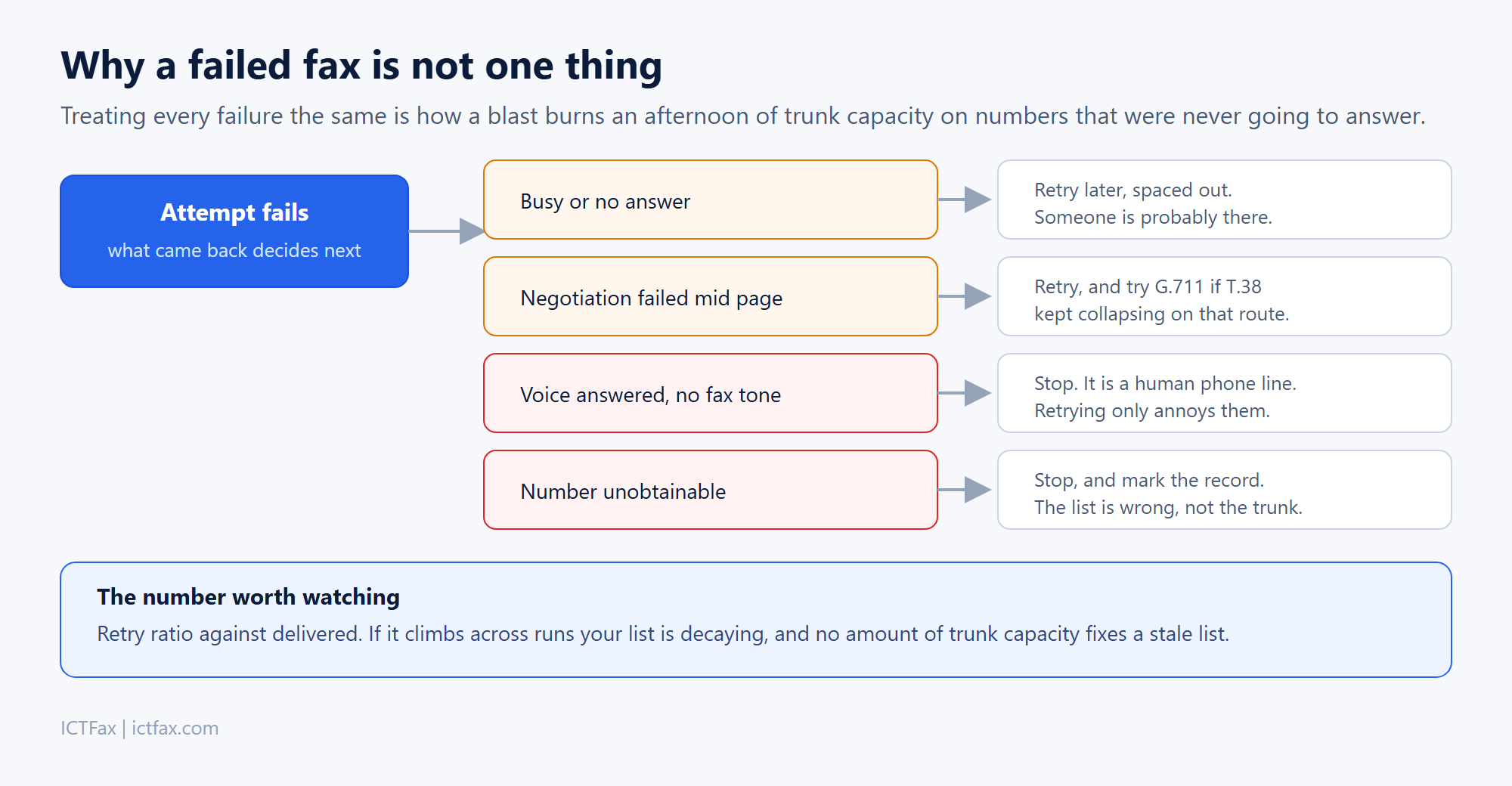
Busy or no answer means someone is probably there, so it goes back in the queue spaced out. A negotiation that collapsed mid page is worth another attempt, possibly with a codec fallback if T.38 keeps failing on that route. A voice answering with no fax tone means you’re calling a person, and hammering it just irritates them. An unobtainable number means your list is wrong, and no retry policy fixes that.
Treat all four identically and you’ll spend the afternoon of trunk capacity you paid for on numbers that were never going to answer.
The report is what you’ll actually use
Campaign wise CDR sounds like a checkbox feature and turns out to be the thing people open first after every run. Which numbers delivered, which failed and for what reason, page counts per recipient, and what the run cost in call time.
The metric worth tracking across runs is retry ratio against delivered. When it starts climbing your list is decaying, and that’s a data problem rather than something more capacity will solve.
What you need to run it
A server, a SIP trunk with enough channels for the volume you have in mind, and DIDs. The fax server itself handles rendering, dialling and the T.38 negotiation. Broadcasting sits on top of that as the campaign layer.
Worth being direct about the edition: broadcasting is not in the Community Edition. Community covers your own faxes properly, but sending one document to a list needs Service Provider at $1,600, which also brings multi tenancy, white labelling, the REST API and the reporting. Buying Community first and finding the gap later is the most common mistake we see.
One thing to sort out before your first run
Know your consent position. Unsolicited fax advertising is restricted in most of the markets worth sending to, the United States among them, and the rules are about the content rather than the technology. Existing customers, regulatory notices and transactional documents are a different situation from cold advertising to a purchased list.
The software enforces whatever suppression list you give it. Deciding what belongs on that list is yours, and it’s worth an hour with someone who knows the rules in your market before you send anything at volume.
Questions
How long does a broadcast to 10,000 numbers take?
It depends entirely on channels and page count. Work it out from your concurrent channel limit and the average time per fax, not from the list length. We’ll size it with you if you tell us both numbers.
Can each recipient get a personalised document?
Yes, cover sheets can carry per recipient detail rather than every fax being byte identical.
Does it check a do not call list?
DNC screening runs before dialling, not after. Numbers on the suppression list never get attempted, so they don’t consume channel time either.
What happens to numbers that fail every retry?
They close out with a reason in the campaign report. That report is the thing to hand back to whoever owns the list, because repeated hard failures mean the data needs cleaning.
Can we run this for our own customers?
That’s what Service Provider Edition is for. Multi tenant with white labelling, so each customer sees their own campaigns and branding. Past a single server, SP Scalable at $8,000 is the turnkey option.
Is there a per fax charge?
Not from us. The licence is a one off and your ongoing cost is call time on your own trunk.
Talk to us about volume
Tell us roughly how many numbers per run, how often, and how many channels your trunk gives you. We will tell you whether your current setup can carry it. If you already know it fits, the Service Provider Edition is the one that includes broadcasting.
Buy Service Provider Edition – $1,600 Ask about volume
Running past one server? SP Scalable is $8,000. Full comparison on the packages and pricing page.