
ICTFax is fax server software you run yourself. It sends and receives faxes over IP, so there’s no machine, no dedicated analogue line, and no hosted provider charging you by the page. The licence is a one off, starting at $300, and the software is GPL.
The problem with the two usual options
Most organisations still faxing have landed on one of two things, and both get uncomfortable at scale.
The machine in the corner works until it doesn’t. Someone has to be standing next to it, the line costs money every month whether you send anything or not, and confirmation means a curling thermal receipt nobody keeps.
Hosted fax services fix that and then bill you per page. Fine at fifty pages a month. Less fine at fifty thousand, and worse if the documents are the kind that legally shouldn’t be sitting on someone else’s infrastructure. Healthcare and legal teams usually discover this when their compliance officer asks a question they can’t answer.
A fax server is the third option: the convenience of the hosted service, on hardware you control, with the cost fixed at the licence rather than scaling with volume.
How it actually works
The document never becomes paper. Someone emails an attachment, uploads it through the web interface, or posts it to the REST API. ICTFax renders it to a fax image, queues it, dials out through your SIP trunk, negotiates with whatever the recipient still has plugged in, and writes the result to the log.
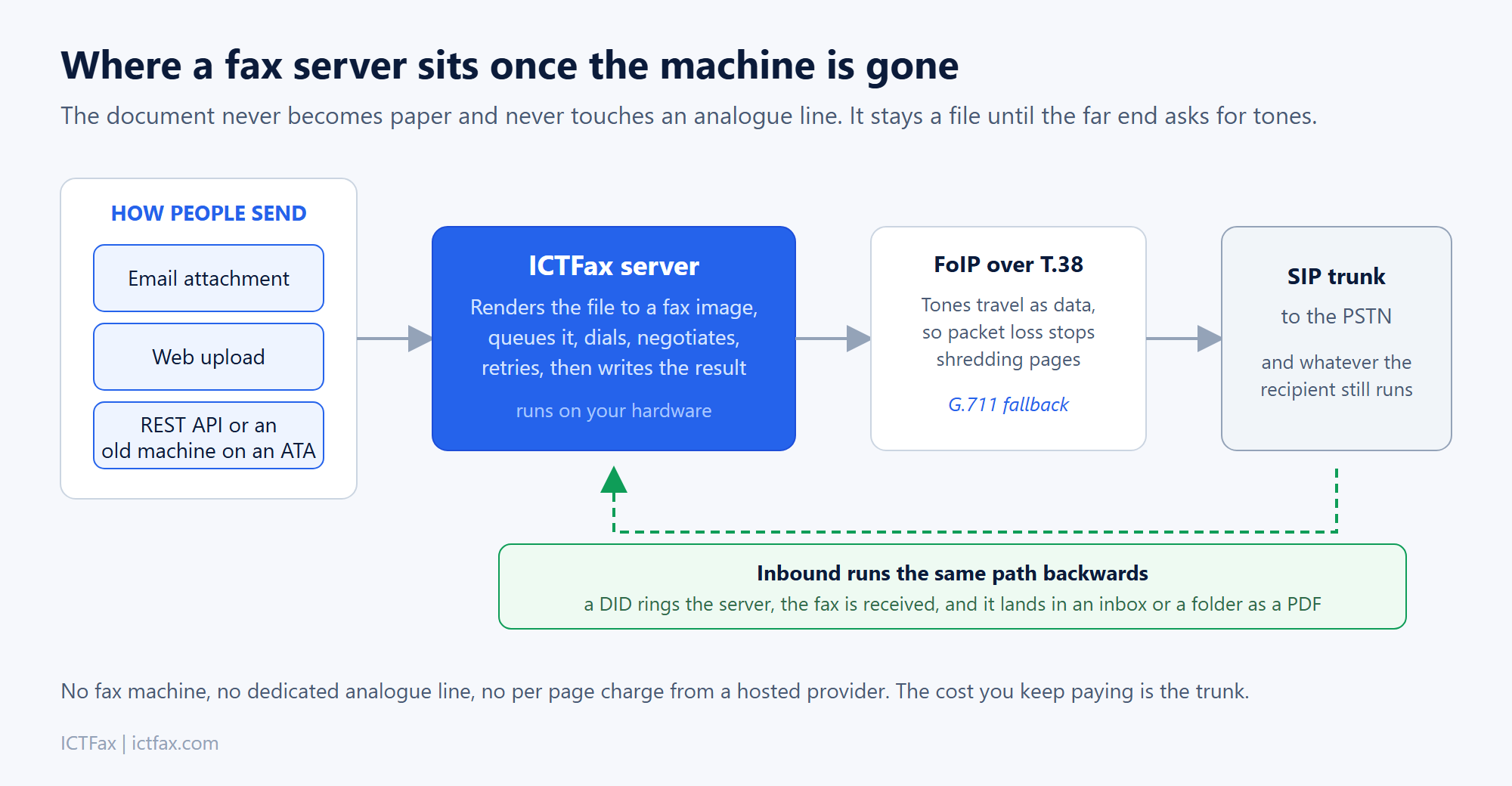
Transport is FoIP using T.38, which carries the tones as data rather than as audio. That matters more than it sounds. Fax over a plain voice codec falls apart the moment a few packets go missing, and you get half a page or a failed negotiation. T.38 was designed for exactly this, with G.711 as a fallback on routes where T.38 misbehaves.
Inbound runs the same path in reverse. A DID rings the server, the fax arrives, and it lands in someone’s inbox as a PDF instead of a tray.
What you get
Every edition covers the basics properly: email to fax, fax to email, web to fax, unlimited users, DID management, multiple file types and multiple attachments per fax. You can append the body of an email as a cover page, and there’s DNC support so a suppression list is enforced before anything dials.
If you still have physical machines you’re not ready to retire, they can sit on an ATA and keep working against the server. That tends to matter in practice, because there’s usually one department that will not give theirs up.
Pick an edition
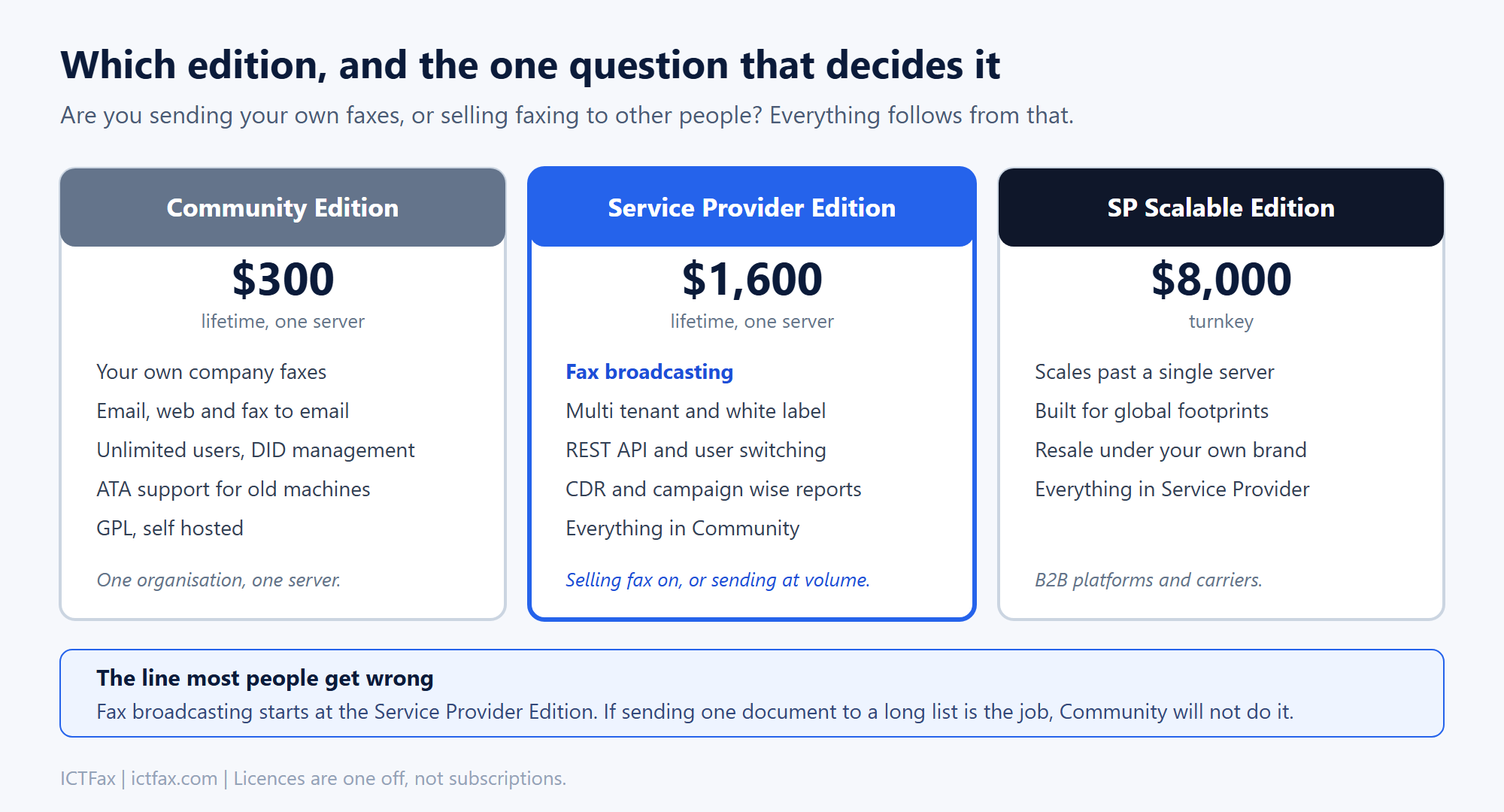
| Edition | Best for | Licence | |
|---|---|---|---|
| Community | One organisation, one server. Your own traffic. | $300 | Buy Community |
| Service Provider | Multi tenant, white label, REST API, and fax broadcasting. Selling fax on, or sending at volume. | $1,600 | Buy Service Provider |
| SP Scalable | Past a single server. Global footprint, resale under your brand. | $8,000 | Buy Scalable |
These are one off licences, not subscriptions. You buy the version you need and keep it.
The line people most often get wrong is broadcasting. Sending one document to a long list is a Service Provider feature, not a Community one. If that’s the actual job, start there rather than buying Community and discovering the gap afterwards.
Where the open source edition fits
ICTFax is GPL and the community project lives at ictfax.org, with the source on GitHub. You can download it, read it, and run it without talking to us at all. Plenty of people do.
What the commercial editions add is multi tenancy, white labelling, the REST API, broadcasting and the reporting that service providers need in order to bill their own customers. If none of that describes you, the free version is genuinely the right answer and we’d rather say so.
Questions
Do we need a fax machine or an analogue line?
Neither. You need a SIP trunk that supports T.38, and DIDs for the numbers you want to receive on. Existing machines can stay on an ATA if you want to keep them.
Is there a per page charge?
Not from us. The licence is one off. Your ongoing cost is whatever your trunk provider charges for the calls, which is usually a fraction of per page fax pricing once volume is real.
Can it handle HIPAA or similar requirements?
The relevant point is that documents and logs stay on infrastructure you control, which is the part hosted services can’t offer. The compliance work itself, access controls, retention, audit, is yours to configure. We can help with that, but no software makes an organisation compliant on its own.
What does it run on?
Linux, with FreeSWITCH underneath handling the call side. It ships as RPM packages and as Docker images.
How many concurrent faxes can it handle?
That’s set by your trunk and your channel count rather than the software. Sizing is straightforward once you know your peak hour and average page count, and we’ll work it out with you.
Can we migrate from HylaFAX or a hosted provider?
Yes. DIDs port, users move, and historic records can be brought across. The usual friction is the trunk, not the data.
Get started
If you already know which edition fits, buy it directly. If you are not sure, tell us your monthly volume, whether you are faxing for yourself or for customers, and what trunk you have. That is usually enough for us to point you at the right one in a single reply.
Buy Service Provider Edition Ask us which edition
Prefer to compare first? See the full feature comparison across all three editions.